How the messages component work?
Type of messages!#
You can send 5 type of messages:#
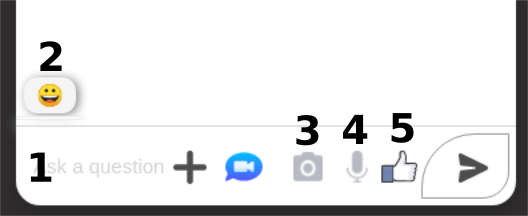
- 1 - Send classic text message with keyboard of course.
- 2 - Send emoji with bubble animation.
- 3 - Send picture (jpg or png only) with comment text .
- 4 - Message text from speech recognition.
- 5 - Thumbs up with little animation.
In total, there are 6 types of messages with the videoChat component, but I don't talk about this type of message in this chapter, for the video chat, see the next chapter...
1 - How classic text messages work?#
All message types go through this feature (by newMessage state in frontend) when sending.
Backend.#
Environment variables for messages server#
# .env----------------------FRONTEND_URL="http://localhost:3000"SOCKET_MESSAGES_UPLOAD_PORT=4000Socket.io server.#
// server.js----------------------
...
// import socket.io & cors security for chatconst io = require("socket.io")(server, {  cors: {    origin: process.env.PORT || process.env.FRONTEND_URL,  },});
...
// socket.io Eventsconst NEW_CHAT_MESSAGE_EVENT = "newChatMessage";const START_TYPING_MESSAGE_EVENT = "START_TYPING_MESSAGE_EVENT";const STOP_TYPING_MESSAGE_EVENT = "STOP_TYPING_MESSAGE_EVENT";// port for socket.io messagesconst PORT = process.env.SOCKET_MESSAGES_UPLOAD_PORT;// init socket connectionio.on("connection", (socket) => {  // Join a conversation  const { roomId } = socket.handshake.query;  socket.join(roomId);
  // Listen for new messages  socket.on(NEW_CHAT_MESSAGE_EVENT, (data) => {    io.in(roomId).emit(NEW_CHAT_MESSAGE_EVENT, data);  });
  // Listen start typing events  socket.on(START_TYPING_MESSAGE_EVENT, (data) => {    console.log("Received true on server :", data);    io.in(roomId).emit(START_TYPING_MESSAGE_EVENT, data);  });  // Listen stop typing events  socket.on(STOP_TYPING_MESSAGE_EVENT, (data) => {    console.log("Received false on server :", data);    io.in(roomId).emit(STOP_TYPING_MESSAGE_EVENT, data);  });
// Leave the room if the user closes the socket socket.on("disconnect", () => { socket.leave(roomId); });});...Frontend.#
Socket.io connexion.#
Environment variable for socket.io server connexion#
REACT_APP_SOCKET_WEBSERVICE=http://localhost:4000The logic is in useChat customHook#
// useChat.js----------------------// MODULES IMPORTSimport { useEffect, useRef, useState } from "react";import { useRecoilState } from "recoil";import socketIOClient from "socket.io-client";// STATEMANAGMENT IMPORTSimport roomIdAtom from "chatComponents/stateManager/atoms/roomIdAtom";...
// socket.io Eventsconst NEW_CHAT_MESSAGE_EVENT = "newChatMessage"; // Name of the eventconst SOCKET_SERVER_URL = `${process.env.REACT_APP_SOCKET_WEBSERVICE}`;const START_TYPING_MESSAGE_EVENT = "START_TYPING_MESSAGE_EVENT";const STOP_TYPING_MESSAGE_EVENT = "STOP_TYPING_MESSAGE_EVENT";
const useChat = () => {  ...  const [messages, setMessages] = useState([]); // Sent and received messages  const socketRef = useRef();  const [dateTime, setDateTime] = useState("");  const [newMessage, setNewMessage] = useState(""); // Message to be sent  const [isTaping, setIsTaping] = useState(false);  const [senderIdNotif, setSenderIdNotif] = useState("");  const [senderIdTyping, setSenderIdTyping] = useState("");  const [roomId] = useRecoilState(roomIdAtom);  const [writingUsers, setWritingUsers] = useState({    senderId: "",    isTaping: false,  });  ...
  useEffect(() => {    // Creates a WebSocket connection    socketRef.current = socketIOClient(SOCKET_SERVER_URL, {      query: { roomId },    });
    // Listens for incoming messages    socketRef.current.on(NEW_CHAT_MESSAGE_EVENT, (message) => {      const incomingMessage = {        ...message,        ownedByCurrentUser: message.senderId === socketRef.current.id,      };      console.log("socket :", socketRef);      setMessages((messages) => [...messages, incomingMessage]);    });    // Start typing message animation    socketRef.current.on(START_TYPING_MESSAGE_EVENT, (typingInfo) => {      if (typingInfo.senderId !== socketRef.current.id) {        const isWrite = typingInfo;        setSenderIdNotif(isWrite.senderId);        setWritingUsers(isWrite);      }    });  // Stop typing message animation    socketRef.current.on(STOP_TYPING_MESSAGE_EVENT, (typingInfo) => {      if (typingInfo.senderId !== socketRef.current.id) {        setSenderIdTyping(typingInfo.isTaping);        const isWrite = typingInfo;        setWritingUsers(isWrite);      }    });
    // Destroys the socket reference    // when the connection is closed    return () => {      socketRef.current.disconnect();    };  }, [roomId]);
  // Sends a message to the server that  // forwards it to all users in the same room  const sendMessage = (messageBody) => {     // This is where the object containing the message is built    socketRef.current.emit(NEW_CHAT_MESSAGE_EVENT, {      // FOR EXAMPLE:      // body: messageBody,      // senderId: socketRef.current.id,      // timeStamp: dateTime,    });
   ...
  };  //  START TYPING NOTIFICATION  const startTypingMessage = () => {    if (!socketRef.current) return;    socketRef.current.emit(START_TYPING_MESSAGE_EVENT, {      senderId: socketRef.current.id,      isTaping: true,    });  };  //  STOP TYPING NOTIFICATION  const stopTypingMessage = () => {     if (!socketRef.current) return;    socketRef.current.emit(STOP_TYPING_MESSAGE_EVENT, {      senderId: socketRef.current.id,      isTaping: false,    });  };
  ...
  useEffect(() => {    // If the messages array is in localStorage, then set Messages with all messages.    if (localStorage.getItem("messages") !== null) {      setMessages(JSON.parse(localStorage.getItem("messages")));    }    // If is typing, start typing animation    if (isTaping) {      startTypingMessage();    } else {      stopTypingMessage();      setSenderIdNotif("");      setSenderIdTyping(false);    }  }, [isTaping]);
  return {    ...    messages,    setMessages,    sendMessage,    dateTime,    setDateTime,    newMessage,    setNewMessage,    isTaping,    setIsTaping,    socketRef,    writingUsers,    senderIdNotif,    senderIdTyping,  };};
export default useChat;
Send & receipt messages with useChat customHook#
Let's see to the socket.io working in chatRoom component#
// chatRoom.js----------------------...import roomIdAtom from "chatComponents/stateManager/atoms/roomIdAtom";...
const ChatRoom = (props) => {  ...  const [roomToken, setRoomToken] = useRecoilState(roomIdAtom);  ...  let roomId = { roomToken };  ...  const {    messages,    setMessages,    sendMessage,    dateTime,    setDateTime,    newMessage,    setNewMessage,    isTaping,    setIsTaping,    ...    writingUsers,    senderIdNotif,    senderIdTyping,    ...  } = useChat(roomId); // Creates a websocket and manages messaging  ...  const [ownedByMe, setOwnedByMe] = useState(false);  ...
  // set date for each message  let d = new Date();  let n = d.toLocaleString();

  //  Primitif useEffect hook for roomToken gestion (state & session storage)  useEffect(() => {    if (!roomToken && sessionStorage.getItem("roomName") !== null) {      setRoomToken(sessionStorage.getItem("roomName"));    }    if (roomToken) {      sessionStorage.setItem("roomName", roomToken);    }    if (!roomToken && !sessionStorage.getItem("roomName")) {      const roomId = props.match.params; // Gets roomId from URL      setRoomToken(roomId.roomToken);    }    ...    // Function equal to componentDidUnmount    return () => {      setRoomToken("");      sessionStorage.removeItem("roomName");    };
  }, []);
  // Scroll to bottom messages list function  const scrollToBottom = () => {    messagesEndRef.current?.scrollIntoView({ behavior: "smooth" });  };
  useEffect(() => {    // If messages List is more than 4 --> auto scrool to the bottom    if (messages.length >= 4) {      scrollToBottom();    }   ...  }, [messages, userAllInfos]);
  // New message section  const handleNewMessageChange = (event) => {    // If not media, set the new message with the target value    if (!isReceiveMediaToUser) {      setNewMessage(event.target.value);    }   ...  };
  ...
  // Function to send content message input with one click to the enter key on keyboard  const handleKeypress = (e) => {    //it triggers by pressing the enter key    if (e.code === "Enter" || e.code === "NumpadEnter") {      handleSendMessage();    }  };
  ...  // Function for sending NewMessage to messages array  const handleSendMessage = (e) => {    //  If the input is empty, is equal to preventDefault()    if (newMessage === "") {      return;    }    //  If newMessage(input field) is not empty, send message    if (newMessage !== "") {      ...      setDateTime(n);      sendMessage(newMessage);      setNewMessage("");      setIsTaping(false);      ...    }   ...  };  ...  };
  ...
  // The typing animation function  const handleTypingInput = () => {    if (!isTaping) {      setplusSection(false);      setIsTaping(true);      setTimeout(() => {        setIsTaping(false);      }, 2000);    }  }; ...
  useEffect(() => {    // For knowing if the message is sended by you or the other user    messages.map((message, i) => setOwnedByMe(message.ownedByCurrentUser));    // Function for getting time for each message    function getDateTime() {      setDateTime(n);    }    getDateTime();
    // Set to the localStorage the messages array of objects    localStorage.setItem("messages", JSON.stringify(messages));
   ...  }, [    ...    messages,    dateTime,    n,    setDateTime,    setNewMessage,  ]);
  ...
  // Typing animation function with conditions & return div that content the dot-typing animation  function IsTyping() {    if (clickedChevron) {      setTimeout(() => {        setIsTaping(false);      }, 4000);    }    if (!clickedChevron) {      setTimeout(() => {        setIsTaping(false);      }, 10000);    }    if (senderIdTyping) {      setTimeout(() => {        setIsTaping(false);      }, 4000);    }    return <div className="dot-typing" />;  }
  ...
  return (    <Fragment>     ...     <HeaderChatComponent />     ...     <MessagesComponents />     ...     <BottomChatComponent />    </Fragment>  );};
export default ChatRoom;
now let see the MessagesComponent.js file:#
// MessagesComponent.js----------------------...
const MessagesComponent = (props) => {  ...  // All of this props come from ChatRoom Component  const {    messages,   ...    messagesEndRef,    ...  } = props;  return (    <div>      <ol className="messages-list">        {messages.map((message, i) => {          return (            <span key={i} className="messages-section">              ...
                <ul className="message-date">{message.timeStamp}</ul>               ...                <li                  style={{ position: "relative" }}                  className={`message-item ${                    message.ownedByCurrentUser                      ? "my-message"                      : "received-message"                  }`}                >                  ...                    <p                      style={{                        fontSize: 23,                        marginTop: 0,                        marginBottom: 0,                      }}                    >                      {message.body}                    </p>
                  ...                </li>
              </span>              <div ref={messagesEndRef} />            </span>          );        })}      </ol>    </div>  );};
export default MessagesComponent;
And for finish, see the BottomChatComponent file#
// BottomChatComponent.js----------------------...// All of this props come from ChatRoom Componentconst BottomChatComponent = (props) => {  const {    ...    handleSendMessage,    ...    handleKeypress,    setIsTaping,    ...    handleNewMessageChange,    newMessage,    handleTypingInput,    ...  } = props;
  return (    <div>      ...          <input            disabled={isLoaded ? true : false}            autoComplete="off"            onSelect={handleTypingInput}            id="chat-message-input"            onKeyPress={handleKeypress}            value={newMessage}            onChange={handleNewMessageChange}            placeholder={t("placeholderInputChat")}            className={              !selectedDarkTheme                ? "new-message-input-field light-background"                : "new-message-input-field dark-background"            }          />       ...            <button onClick={handleSendMessage} className="send-message-button">              {/*SVG button file here*/}            </button>          </span>        </div>      </div>    </div>  );};
export default BottomChatComponent;
2 - How emoji's message work?#
emoji's component.#
npm package.#
Link to npm package Here
Component in the App#
The component look like this:
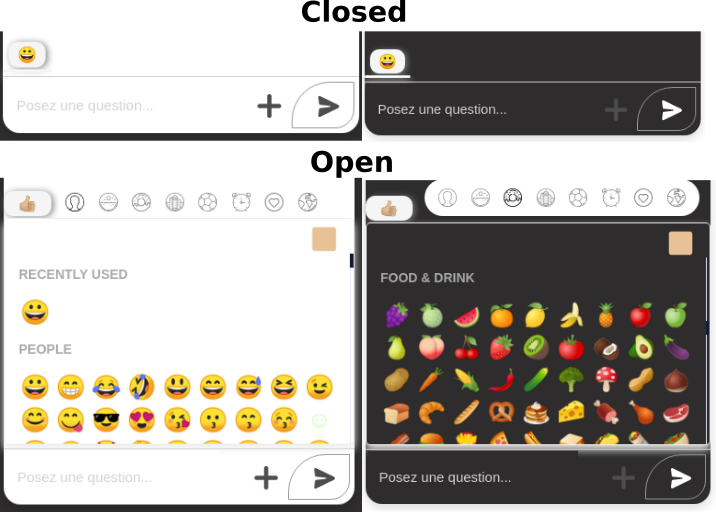
usercase.#
// BottomChatComponent.js----------------------...import Picker, { SKIN_TONE_MEDIUM_LIGHT } from "emoji-picker-react";...// All of this props come from ChatRoom Componentconst BottomChatComponent = (props) => {  const {    ...    onEmojiClick,    clickedChevron,    handleClickChevron,  } = props;
  return (    <div>      ...        <button onClick={handleClickChevron} className="chevron">          {!clickedChevron ? "👍🏼" : "😀"}        </button>        <Picker          onEmojiClick={onEmojiClick}          disableAutoFocus={true}          skinTone={SKIN_TONE_MEDIUM_LIGHT}          groupNames={{ smileys_people: "PEOPLE" }}          native        />      ...    </div>  );};
export default BottomChatComponent;
Sending emoji in new message#
// useChat.js----------------------... // FUNCTION FOR KNOWING IF MESSAGE.BODY CONTENT ALPHANUMERIC OR EMOJI  const regEmoji = newMessage;
  function isNotAlphaNumeric(str) {    /* Iterating character by character to get ASCII code for each character */    for (let i = 0, len = str.length, code = 0; i < len; ++i) {      /* Collecting charCode from i index value in a string */      code = str.charCodeAt(i);
      /* Validating charCode falls into anyone category */      if (        (code > 47 && code < 58) || // numeric (0-9)        (code > 64 && code < 91) || // upper alpha (A-Z)        (code > 96 && code < 123) // lower alpha (a-z)      ) {        /* If its' alphanumeric characters then returning false */        return false;        // if you want true when alphanumeric only decomment this line && comment the top line        // continue;      }
      continue;      // if you want true when alphanumeric only decomment this line && comment the top line      // return false;    }
    /* After validating all the characters and we returning success message ( IF NOT ALPHANUMERIC (EMOJI) CONTENT IS RETURN TRUE ELSE RETURN FALSE)*/    return true;  }
// Sends a message to the server that // forwards it to all users in the same room const sendMessage = (messageBody) => { socketRef.current.emit(NEW_CHAT_MESSAGE_EVENT, { ... isEmoji: isNotAlphaNumeric(regEmoji), ... }); ... };In ChatRoom component
// ChatRoom.js----------------------
import useChat from "chatComponents/hooks/useChat";...import MessagesComponents from "./components/MessagesComponent";import BottomChatComponent from "./components/BottomChatComponent";import HeaderChatComponent from "./components/HeaderChatComponent";...
const ChatRoom = (props) => {  ...  const {    messages,    setMessages,    sendMessage,    ...    newMessage,    setNewMessage,    ...    isNotAlphaNumeric,  } = useChat(roomId); // Creates a websocket and manages messaging
  ...  const [chosenEmoji, setChosenEmoji] = useState(null);  const [clickedChevron, setClickedChevron] = useState(true);
  ...
  // This function is for display or hidden the emoji's section  const handleClickChevron = () => {    if (!clickedChevron) {      setClickedChevron(true);    }    if (clickedChevron) {      setClickedChevron(false);      setplusSection(false);    }    // If the emoji's section is open, that display the typing animation for the other chat users    if (clickedChevron) {      setIsTaping(true);    }    if (!clickedChevron) {      setIsTaping(false);    }  };
  ...
  // Function for setting the newMessage with emoji  const onEmojiClick = (event, emojiObject) => {    setChosenEmoji(emojiObject);    //  If you have already one message text --> add emoji to the text    if (newMessage) {      setNewMessage(newMessage + emojiObject.emoji);      // If you don't have any message text, then set the emoji to newMessage state    } else if (!newMessage) {      setNewMessage(emojiObject.emoji);    }  };
  ...
  return (    <Fragment>      ...        <HeaderChatComponent />        ...        <MessagesComponents />        ...        <BottomChatComponent />      ...    </Fragment>  );};
export default ChatRoom;
Bubble animation.#
Lets see the messagesComponent emoji section!
// MessagesComponent.js----------------------...
const MessagesComponent = (props) => {  ...  const {    ...,    isNotAlphaNumeric,    ...  } = props;
  return (    <div>      <ol className="messages-list">        {messages.map((message, i) => {          return (            <span key={i} className="messages-section">              <span>                ...                <li                  style={{ position: "relative" }}                  className={`message-item ${                    isNotAlphaNumeric(message.body) ? "height45 jello" : ""                  } ${                    message.ownedByCurrentUser                      ? "my-message"                      : "received-message"                  }`}                  ...                >
                    <span className="messagesContent">                      ...                      {isNotAlphaNumeric(message.body) && (                        <p                          style={{                            fontSize: 23,                            marginTop: 0,                            marginBottom: 0,                          }}                        >                          {message.body}                        </p>                      )}                    </span>                  )}                  ...                </li>                ...              </span>             ...            </span>          );        })}      </ol>    </div>  );};
export default MessagesComponent;
The css section:
/* chatRoom.css */----------------------.jello {  animation: jello-horizontal 0.9s both;}
@keyframes jello-horizontal {  0% {    transform: scale3d(1, 1, 1);  }  30% {    transform: scale3d(1.15, 0.65, 1);  }  40% {    transform: scale3d(0.75, 1.15, 1);  }  50% {    transform: scale3d(1.05, 0.85, 1);  }  65% {    transform: scale3d(0.95, 1.02, 1);  }  75% {    transform: scale3d(1.02, 0.95, 1);  }  100% {    transform: scale3d(1, 1, 1);  }}
3 - How picture message work?#
Backend.#
I use Multer & util for this part,
if you dont kwon how is Multer see this link Here
if you dont know how is util, see this link Here
Structure of this Section#
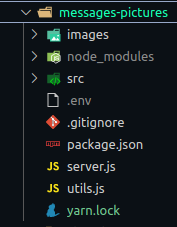
Tree structure of src folder#
# messages-pictures/src/----------------------src ├── controller │ └── file.controller.js ├── middleware │ └── upload.js └── routes └── index.js// messages-pictures/server.js----------------------
...
// UPLOAD PICTURES SECTIONglobal.__basedir = __dirname;// cors option for upload servervar corsOptions = { origin: process.env.FRONTEND_URL,};
app.use(cors(corsOptions));// routes for upload picture serverconst initRoutes = require("./src/routes");// middleware fro upload pictureapp.use(express.json());app.use(express.urlencoded({ extended: true }));initRoutes(app);
...
The upload part in middleware folder#
//  messages-pictures/middleware/upload.js----------------------const util = require("util");const multer = require("multer");// You can limit max size of the picture (2Mb is this case)const maxSize = 2 * 1024 * 1024;
let storage = multer.diskStorage({  destination: (req, file, cb) => {
    cb(null, __basedir + "/images/");  },  filename: (req, file, cb) => {    console.log(file.originalname);    cb(null, file.originalname);  },});
let uploadFile = multer({  storage: storage,  limits: { fileSize: maxSize },}).single("file");
let uploadFileMiddleware = util.promisify(uploadFile);module.exports = uploadFileMiddleware;Routes file for upload & get images for displaying by frontend.#
//  messages-pictures/routes/index.js----------------------...const controller = require("../controller/file.controller");
let routes = (app) => {  // Upload route  router.post("/upload", controller.upload);  ...  //  Upload single file by name route  router.get("/files/:name", controller.download);
 ...};
...The controller#
This component allows you to check some specifications during the sending steps (size of the image for example), of consultation of the images present (if you wish to make a GET {for the admin dashboard for example} of the list of images with the infos specific to each of them), or of the downloading of the image via the front-end.
//  messages-pictures/controller/file.controller.js----------------------...
// This section is implemented if you want to inform the user with messages during the upload stage.const upload = async (req, res) => {  try {    await uploadFile(req, res);
    if (req.file === undefined) {      return res.status(400).send({ message: "Please upload a file!" });    }
    res.status(200).send({      message: "Uploaded the file successfully: " + req.file.originalname,    });  } catch (err) {    if (err.code === "LIMIT_FILE_SIZE") {      return res.status(500).send({        message: "File size cannot be larger than 2MB!",      });    }
    res.status(500).send({      message: `Could not upload the file: ${req.file.originalname}. ${err}`,    });  }};
// This section is for getting images list with infos (name & url) of all files.const getListFiles = (req, res) => {  const directoryPath = __basedir + "/images/";
  fs.readdir(directoryPath, function (err, files) {    if (err) {      res.status(500).send({        message: "Unable to scan files!",      });    }
    let fileInfos = [];
    files.forEach((file) => {      fileInfos.push({        name: file,        url: directoryPath + file,      });    });
    res.status(200).send(fileInfos);  });};
// This section is for downloading the picture.const download = (req, res) => {  const fileName = req.params.name;  const directoryPath = __basedir + "/images/";
  res.download(directoryPath + fileName, fileName, (err) => {    if (err) {      res.status(500).send({        message: "Could not download the file. " + err,      });    }  });};
...
Frontend.#
Create axios service
//  src/chatComponents/http-common.js----------------------import axios from "axios";
export default axios.create({  baseURL: `${process.env.REACT_APP_UPLOAD_WEBSERVICE}`,  headers: {    "Content-type": "application/json",  },});
Create fetch service (post & get)
//  src/services/FileUploadService.js----------------------import http from "chatComponents/http-common";
class FileUploadService {  upload(file, onUploadProgress) {    let formData = new FormData();
    formData.append("file", file);
    return http.post("/upload", formData, {      headers: {        "Content-Type": "multipart/form-data",      },      onUploadProgress,    });  }
  getFiles() {    return http.get("/files");  }}
export default new FileUploadService();
picture component.#
This component look like this:
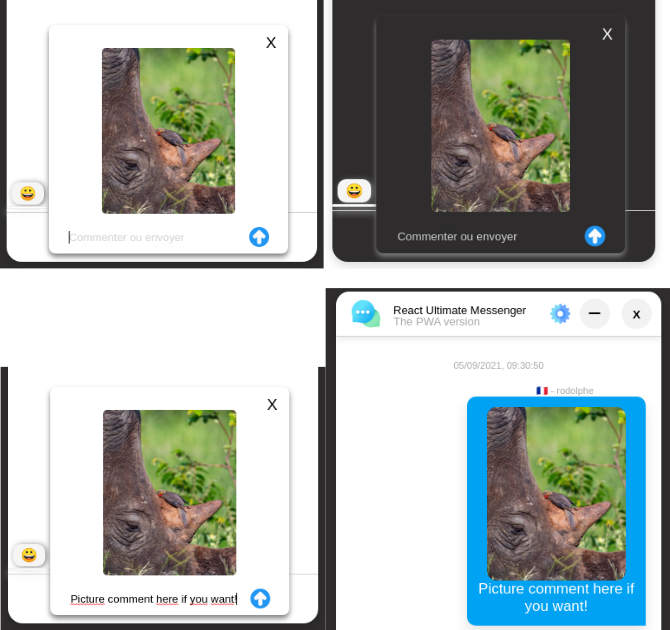
The code behind it
//  src/chatComponents/services/FileUploadService.js----------------------...import UploadService from "chatComponents/services/FileUploadService";...import seeMediaAtom from "chatComponents/stateManager/atoms/seeMediaAtom";import roomIdAtom from "chatComponents/stateManager/atoms/roomIdAtom";import fileFromPictureAtom from "chatComponents/stateManager/atoms/fileFromPictureAtom";import isReceivedMediasMessageToUserAtom from "chatComponents/stateManager/atoms/receiveMediasMessageToUserAtom";import imageInfoAtom from "chatComponents/stateManager/atoms/imageInfoAtom";...
const UploadImages = ({ handleSendMessage, setIsTaping }) => {  const [state, setState] = useRecoilState(fileFromPictureAtom); ...  const [isReceiveMediaToUser, setIsReceiveMediaToUser] = useRecoilState(    isReceivedMediasMessageToUserAtom  );  ...  const [isImageList, setIsImageList] = useRecoilState(imageInfoAtom);  const { setNewMessage, pictComment, setPictComment } = useChat(roomIdAtom);  const [seingPict] = useRecoilState(seeMediaAtom);
  useEffect(() => {    UploadService.getFiles().then((response) => {      setState({        imageInfos: response.data,      });      setIsImageList({        imageInfos: response.data,      });    });  }, [setState, setIsImageList, isReceiveMediaToUser]);
  ...
  function selectFile(e) {    setState({      currentFile: e.target.files[0],      previewImage: URL.createObjectURL(e.target.files[0]),      progress: 0,      message: "",    });
    setNewMessage(isImageList.currentFile?.name);  }
  function upload() {    setState({      progress: 0,    });
    UploadService.upload(state.currentFile, (e) => {      setState({        progress: Math.round((100 * e.loaded) / e.total),      });    })      .then((response) => {        setState({          message: response.data.message,        });        return UploadService.getFiles();      })      .then((files) => {        setState({          imageInfos: files.data,        });      })      .catch((err) => {        console.log(err);        setState({          progress: 0,          message: "Could not upload the image!",          currentFile: undefined,        });      });
    setIsReceiveMediaToUser(true);    setPlusSection(false);
    setTimeout(() => {      handleSendMessage();    }, 800);  }
  const { previewImage } = state;  return (    <div>      {previewImage && (        <div          className={            selectedDarkTheme              ? "preview-container dark-background"              : "preview-container"          }        >          <div className="preview-modal-head">            <h1              style={{ cursor: "pointer" }}              className="closed-preview-img"              onClick={() => {                setState({ previewImage: undefined });                window.location.reload();              }}            >              X            </h1>          </div>          <img            style={{ maxWidth: 190, maxHeight: 200 }}            className="preview-picture-content"            src={previewImage}            alt=""          />          <hr style={{ width: "100%", color: "#000" }} />          <div className="comment-picture-bottom">            <input              autoComplete="off"              className={selectedDarkTheme ? "dark-background white" : ""}              style={{ outline: "none", border: "none" }}              type="text"              value={pictComment}              onSelect={() => {                setIsTaping(true);              }}              onKeyPress={handleKeypress}              placeholder="Commenter ou envoyer"              onChange={(e) => setPictComment(e.target.value)}              autoFocus            />            <img onClick={upload} className="up-arrow" src={upArrow} alt="" />          </div>        </div>      )}
      <div className="row">        {!previewImage && (          <div className="col-8">            <input              placeholder="click"              type="file"              accept="image/png, image/jpeg"              onChange={selectFile}              id="actual-btn"              hidden            />            {seingPict && (              <label                className="label-custom-button-upload"                htmlFor="actual-btn"              >                <div className="tooltip">                  <img                    style={{ width: 22, height: 22 }}                    src={camera}                    alt="camera"                  />                  <span                    style={{ fontSize: 12, padding: 10 }}                    className="tooltiptext"                  >                    image au format jpg et png seulement !                  </span>                </div>              </label>            )}          </div>        )}      </div>    </div>  );};
export default UploadImages;
Display to MessagesComponent by chatRoom messages component.#
//  src/chatComponents/components/chatRoom/ChatRoom/ChatRoom.js----------------------...import UploadService from "chatComponents/components/FileUploadService";...  // Primitif hook for displaying picture on the messages list after is sended to the server  useEffect(() => {    UploadService.getFiles().then((response) => {      setState({        imageInfos: response.data,      });    });  }, [setState]);  ...   useEffect(() => {    // For knowing if the message is sended by you or the other user    messages.map((message, i) => setOwnedByMe(message.ownedByCurrentUser));    ...    // If the current file (picture) name exist, then --> automatic set The newMessage state with the picture name    if (state.currentFile?.name) {      setNewMessage(state.currentFile?.name);    }
    if (messages) {      setFilePictFromList(isImageList.imageInfos.map((resLink) => resLink));      setFilePictFromMess(messages.map((resBody) => resBody.body));    }  }, [    messages,    ...    isImageList,    setNewMessage,    state,  ]);
  return(    ...    <MessagesComponents />    <BottomComponent />  )
See the MessagesComponent
//  src/chatComponents/components/chatRoom/ChatRoom/components/MessagesComponent.js----------------------...
const MessagesComponent = (props) => {  ...  const {    ...    messages,    seingMedia,    ...  } = props;
  return (    <div>      <ol className="messages-list">        {messages.map((message, i) => {          return (            <span key={i} className="messages-section">              <span>                ...                <ul className="message-date">{message.timeStamp}</ul>                ...                <li>                  ...                  {message.body?.includes("jpg", 0) ||                  message.body?.includes("JPG", 0) ||                  message.body?.includes("jpeg", 0) ||                  message.body?.includes("JPEG", 0) ||                  message.body?.includes("png", 0) ||                  message.body?.includes("PNG", 0) ? (                    <Fragment>                      {seingMedia ? (                        <span className="display-picture">                          <img                            style={{                              borderRadius: 11,                              maxWidth: 186,                              maxHeight: 200,                            }}                            src={`${process.env.REACT_APP_UPLOAD_WEBSERVICE}/files/${message.body}`}                            alt=""                          />                          {message.comment && (                            <Fragment>                              <p style={{ textAlign: "center" }}>                                {message.comment}                              </p>                            </Fragment>                          )}                          {!toggleDeleteButton && <div ref={messagesEndRef} />}                        </span>                      )}                      ...                    </Fragment>                  ) :(                  ...                  ) : (                    ...                  )}              </li>              ...            </span>          );        })}      </ol>    </div>  );};
export default MessagesComponent;
4 - How Speech to text message work?#
npm package.#
I use React-speech-recognition for doing that!
Link to npm package.
The component!#
This component look like this:
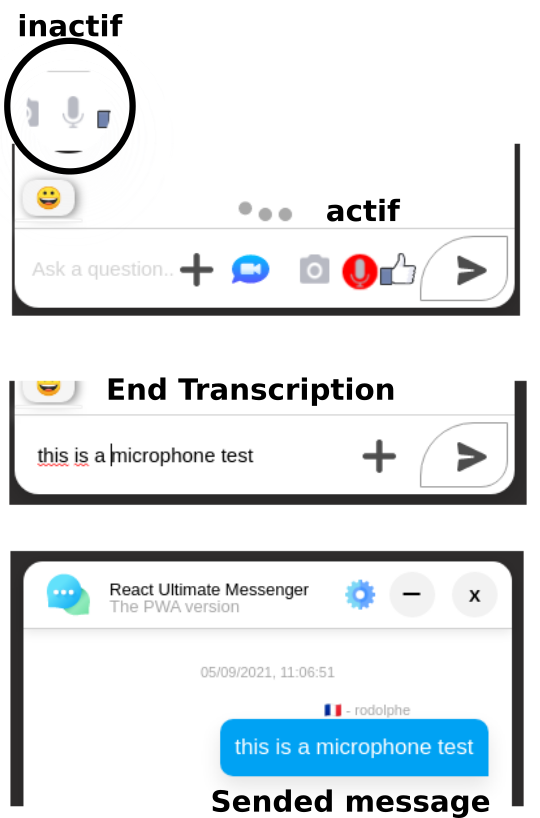
usercase.#
The SpeechToText Component#
//  src/chatComponents/components/speech-recognition/SpeechToText.js----------------------// CSS IMPORTSimport "./speechToText.css";// HOOKS IMPORTSimport useSpeechToText from "chatComponents/hooks/useSpeechToText";// ASSETS IMPORTSimport microPhoneIcon from "chatComponents/assets/micro.png";
const SpeechToText = () => {  const { isListening, microphoneRef, handleListing, stopHandle } =    useSpeechToText();
  return (    <div className="microphone-wrapper">      <div className="mircophone-container">        {!isListening ? (          <div            style={{ cursor: "pointer" }}            className="microphone-icon-container"            ref={microphoneRef}            onClick={handleListing}          >            <img              src={microPhoneIcon}              alt="micro"              style={{ width: 16, margin: 10 }}              className="microphone-icon"            />          </div>        ) : (          <div            style={{ cursor: "pointer" }}            className="microphone-icon-container-on heartbeat"            ref={microphoneRef}            onClick={stopHandle}          >            <img              src={microPhoneIcon}              alt="micro"              style={{ width: 16, margin: "14px 0px 0px 14px" }}              className="microphone-icon"            />          </div>        )}      </div>    </div>  );};export default SpeechToText;
BottomChatComponent#
//  src/chatComponents/components/chatRoom/ChatRoom/components/BottomChatComponent.js----------------------import SpeechToText from "chatComponents/components/speech-recognition/SpeechToText";
const BottomChatComponent = (props) => { ... return ( <div> ... <span className={plusSection ? "" : "hiddenParams"}> <SpeechToText /> </span> ... </div> )}...SpeechToText customHook#
//  src/chatComponents/hooks/useSpeechToText.js----------------------// MODULES IMPORTSimport { useEffect, useRef } from "react";import SpeechRecognition, {  useSpeechRecognition,} from "react-speech-recognition";import { useRecoilState } from "recoil";// HOOKS IMPORTSimport useChat from "./useChat";// STATEMANAGMENT IMPORTSimport isListeningAtom from "chatComponents/stateManager/atoms/isListeningAtom";import speechToTextAtom from "chatComponents/stateManager/atoms/speechToTextAtom";import roomIdAtom from "chatComponents/stateManager/atoms/roomIdAtom";import isLanguageAtom from "chatComponents/stateManager/atoms/isLanguageAtom";
const useSpeechToText = () => {  const [isListening, setIsListening] = useRecoilState(isListeningAtom);  const microphoneRef = useRef(null);  const { setIsTaping, setNewMessage } = useChat(roomIdAtom);  const [speechToTextConversion, setSpeechToTextConversion] =    useRecoilState(speechToTextAtom);  const [isLanguage] = useRecoilState(isLanguageAtom);
  const { transcript, resetTranscript, browserSupportsSpeechRecognition } =    useSpeechRecognition();
  const handleListing = () => {    ...    SpeechRecognition.startListening({      continuous: true,      language:        isLanguage === "fr" ? "fr-FR" : isLanguage === "pt" ? "pt-br" : "en-GB",    });  };  const stopHandle = () => {    ...    SpeechRecognition.stopListening();    setSpeechToTextConversion(transcript);    resetTranscript();  };
  ...
  if (!browserSupportsSpeechRecognition) {    return <span>Browser doesn't support speech recognition.</span>;  }  return {    isListening,    microphoneRef,    handleListing,    stopHandle,  };};
...
In ChatRoom component#
//  src/chatComponents/components/chatRoom/ChatRoom/ChatRoom.js----------------------import { useSpeechRecognition } from "react-speech-recognition";import { useRecoilState } from "recoil";...const ChatRoom = (props) => {  ...  const { resetTranscript } = useSpeechRecognition();  const [speechToTextConversion, setSpeechToTextConversion] =    useRecoilState(speechToTextAtom);  ...
   useEffect(() => {    // If the message come from speech to text functionality    //  That set NewMessage state with the transcription content    if (speechToTextConversion !== "") {      setNewMessage(speechToTextConversion);    }
  }, [speechToTextConversion]);
  ...
  //  If newMessage(input field) is not empty, send message and...    if (newMessage !== "") {      ...      // erase text converted to input field      setSpeechToTextConversion("");      ...      // And reset transcript content      resetTranscript();    }    ...

   return (    <Fragment>    ...    </Fragment>   )}
5 - How Thumbs up message work?#
Logic.#
This picture is not sended to the backend, only the name of the picture is sended in body content message (by newMessage state like all other messages features)
Explanations.#
The svg picture#
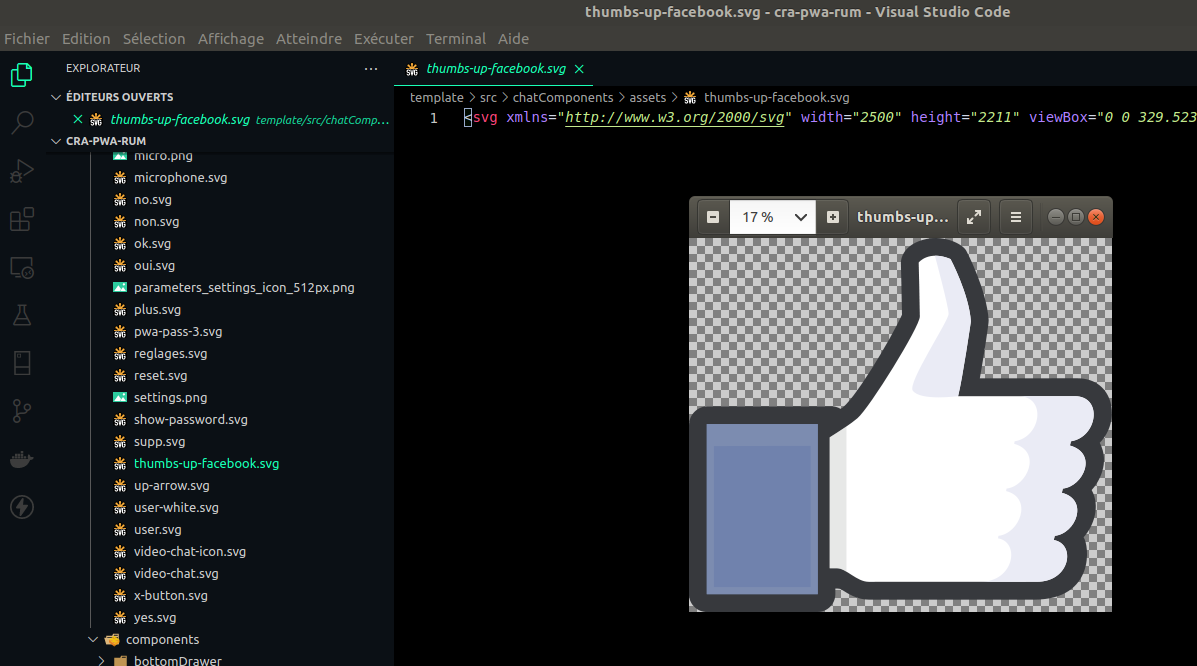
The logic in ChatRoom component#
//  src/chatComponents/components/chatRoom/ChatRoom/ChatRoom.js----------------------...import Thumb from "chatComponents/assets/thumbs-up-facebook.svg";...const ChatRoom = (props) => {  ...   const [isSendThumb, setIsSendThumb] = useState(false);   ...  //  FOR SENDING MESSAGE BY NEWMESSAGE STATE   // Thumbs up facebook message functionality, set the values here  const handleSendThumb = () => {    setIsSendThumb(true);    setNewMessage("thumbs-up-facebook.svg");  };  ...  //  IF NEWMESSAGE CONTAIN THE PICTURE NAME   useEffect(() => {    // Thumbs up facebook message functionality, send the message here    if (newMessage.includes("thumbs-up-facebook.svg")) {      setTimeout(() => {        sendMessage(newMessage);        setNewMessage("");      }, 300);    }
}, [newMessage]); ... return ( <MessagesComponents ... Thumb={Thumb} ... /> ... <BottomChatComponent ... Thumb={Thumb} handleSendThumb={handleSendThumb} ... /> ... )}...Sending the picture in BottomChatComponent#
// src/chatComponents/components/chatRoom/ChatRoom/components/BottomChatComponent.js----------------------const BottomChatComponent = (props) => { const { ... Thumb, handleSendThumb, ... } = props; return ( ... <span className={plusSection ? "" : "hiddenParams"} onClick={handleSendThumb} > <img style={{ width: 27, cursor: "pointer", marginRight: 15 }} src={Thumb} alt="thumb" /> </span> ... )}The Thumb Props in MessagesComponent#
// src/chatComponents/components/chatRoom/ChatRoom/components/MessagesComponent.js----------------------...const MessagesComponent = (props) => { ... const { ... Thumb, ... } = props; return ( ... {message.body.includes("thumbs-up-facebook.svg") && ( <img // shake-bottom is keyframes animation className="shake-bottom" style={{ width: 40, cursor: "pointer" }} src={Thumb} alt="thumb" /> )} ... )}Css animation#
/* src/chatComponents/components/chatRoom/ChatRoom/ChatRoom.css */----------------------.shake-bottom { animation: shake-bottom 2s cubic-bezier(0.455, 0.03, 0.515, 0.955) both;}@keyframes shake-bottom { 0%, 100% { transform: rotate(0deg); transform-origin: 50% 100%; } 10% { transform: rotate(2deg); } 20%, 40%, 60% { transform: rotate(-4deg); } 30%, 50%, 70% { transform: rotate(4deg); } 80% { transform: rotate(-2deg); } 90% { transform: rotate(2deg); }}Ok, right now, let see the video chat component!