Optional Video chat Section!
Warning: this component is not a videoconference component, it is a video chat one to one person#
First of all, let's see the component and how to use it!#
The component appears when you click on the first icon (from the left) in the chat toolbox.
You have two features:
Invite someone!
Call someone!
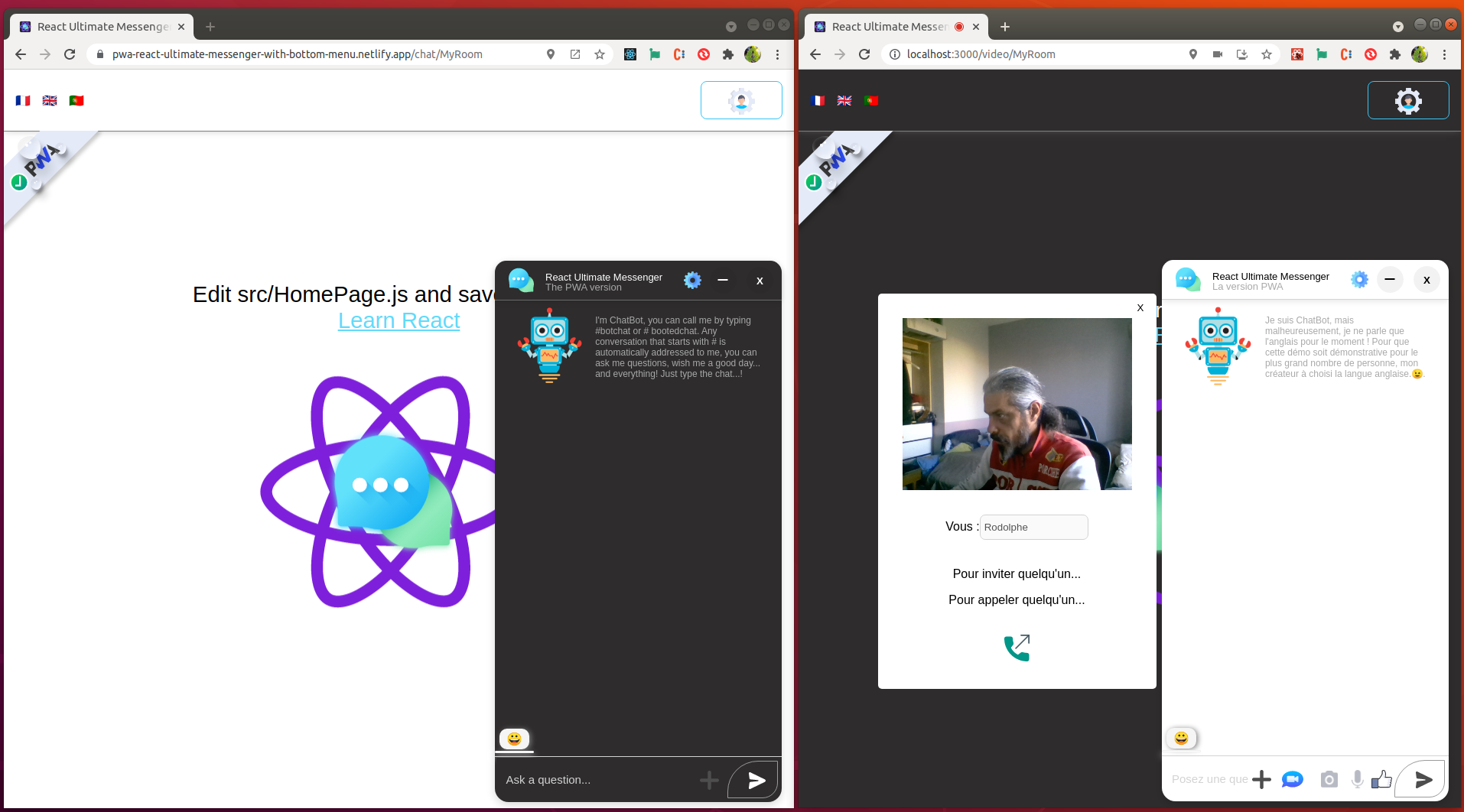
Click on "invite someone!
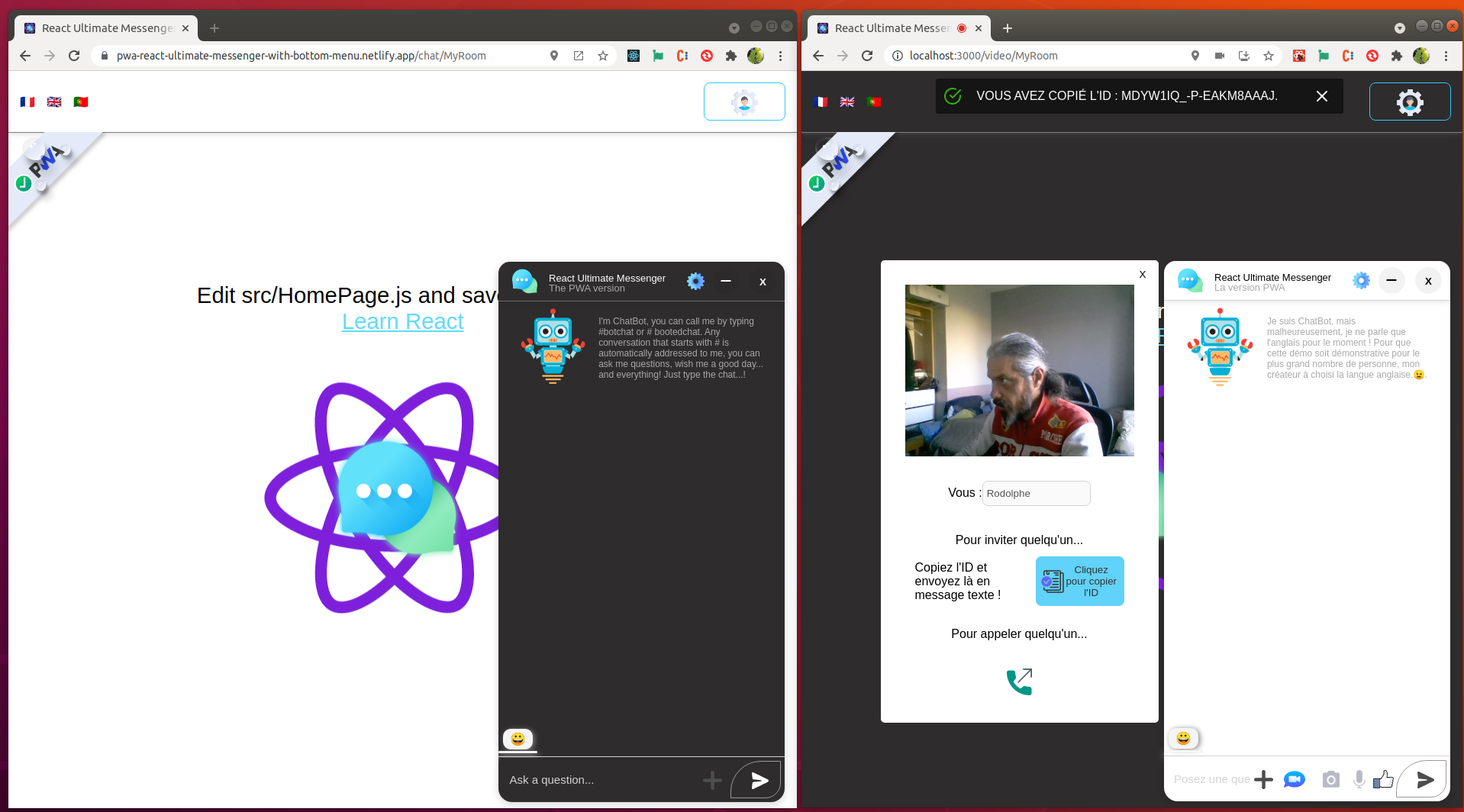
You have a button that appears, this button generates a connection id, click on it, the id is automatically copied in your clipboard.
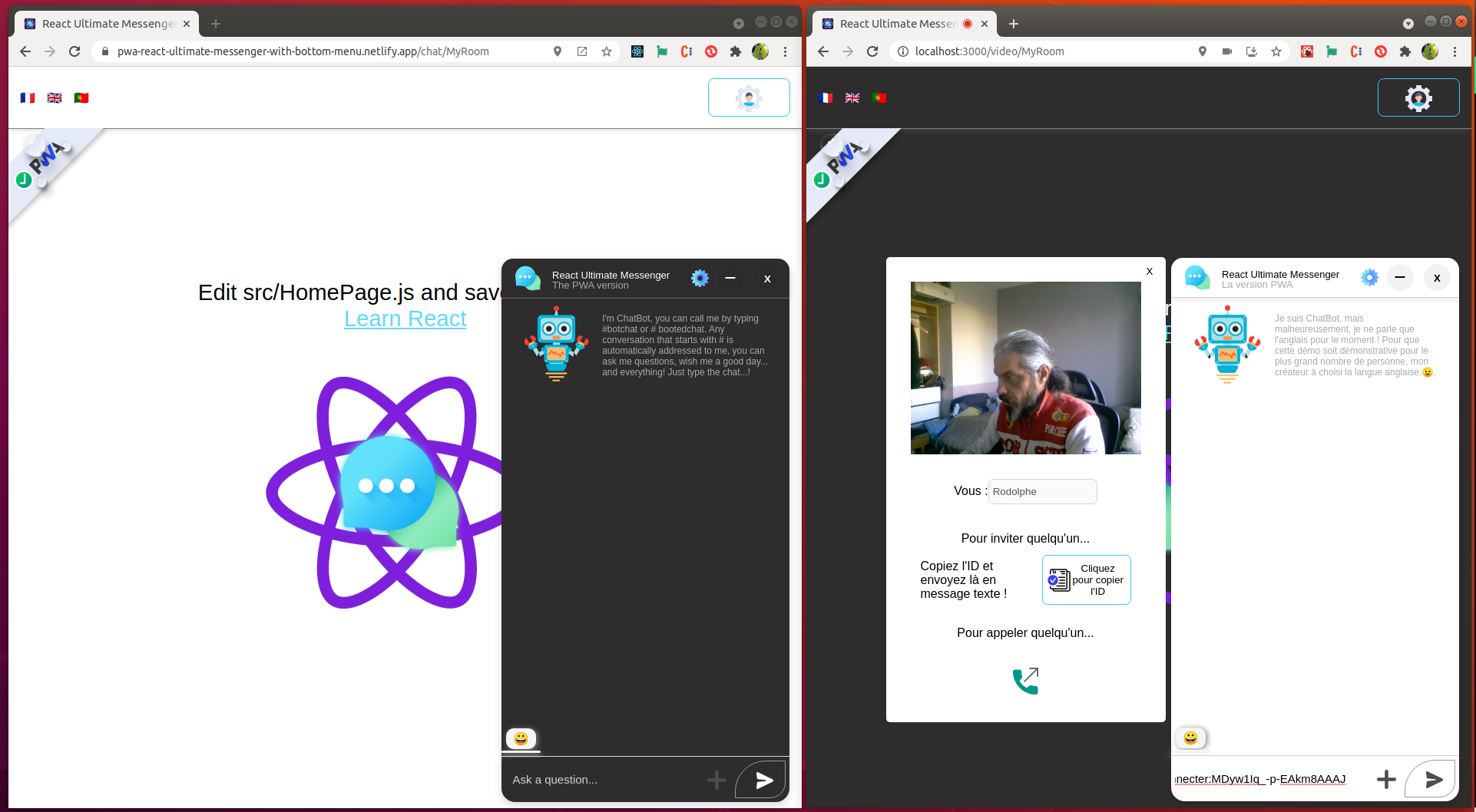
Click in the conversation input and paste the previously copied id!
Once the message is sent, the user who receives the invitation to a button in the conversation bubble.
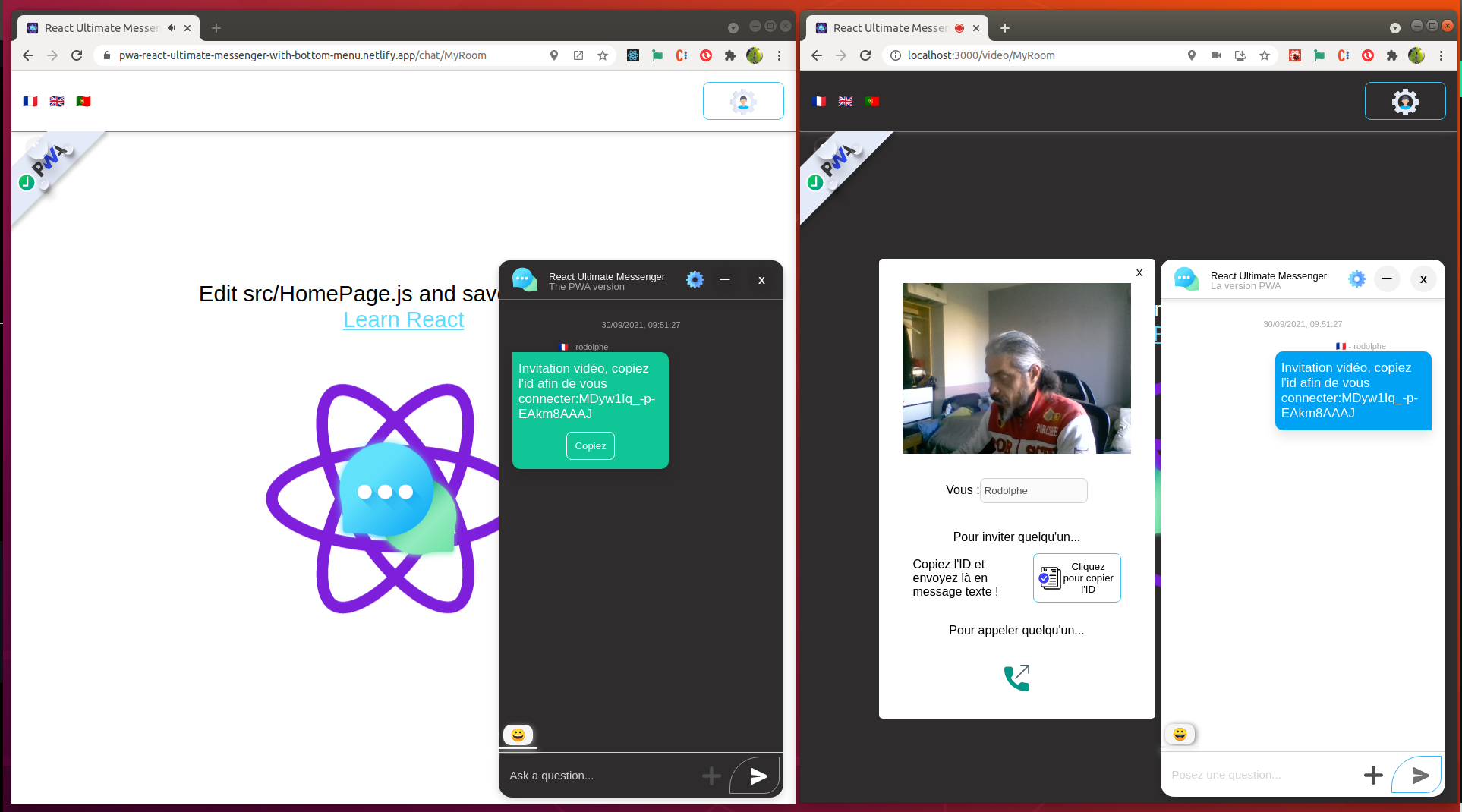
This button automatically copies the id in the clipboard...
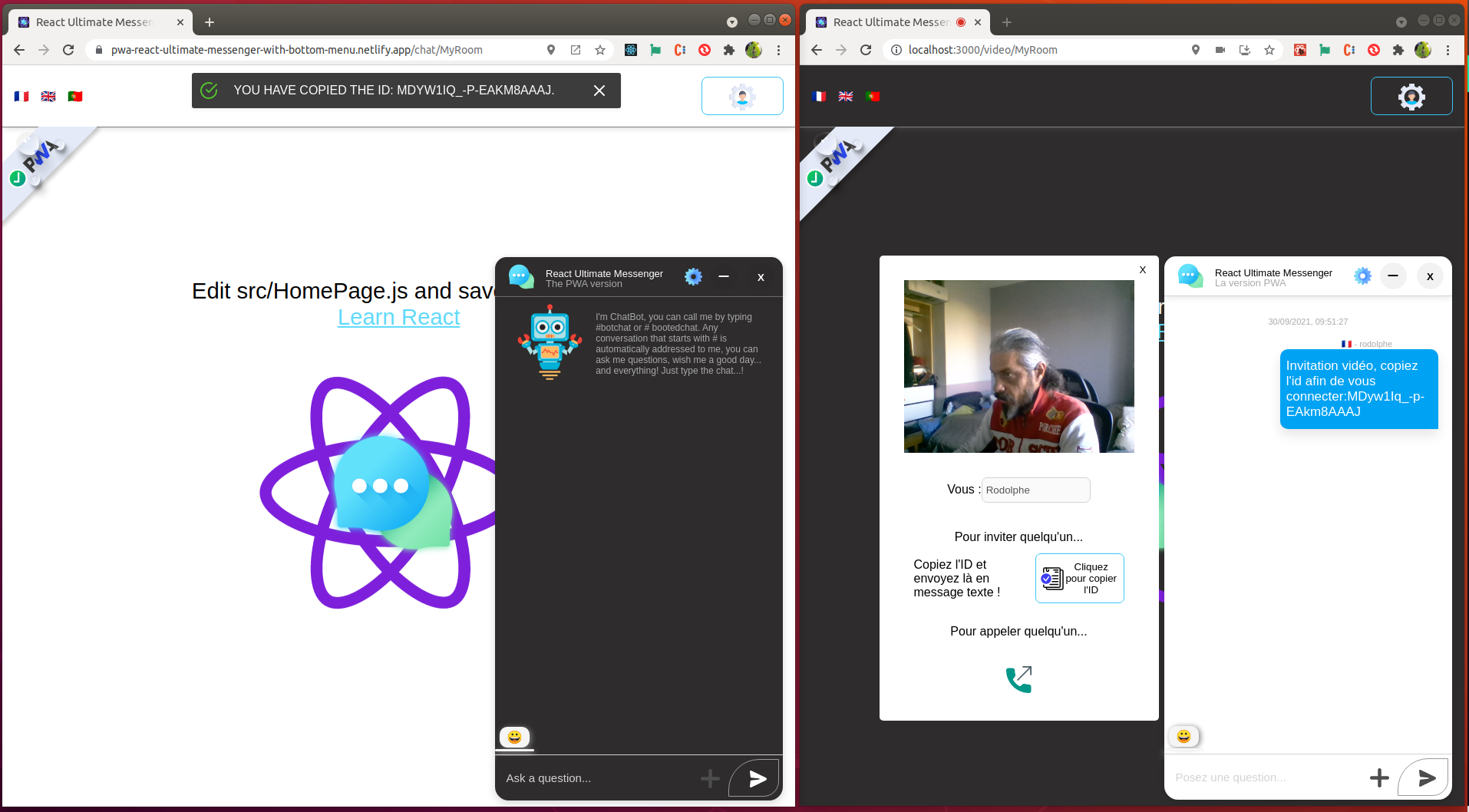
And the video chat component appears automatically!
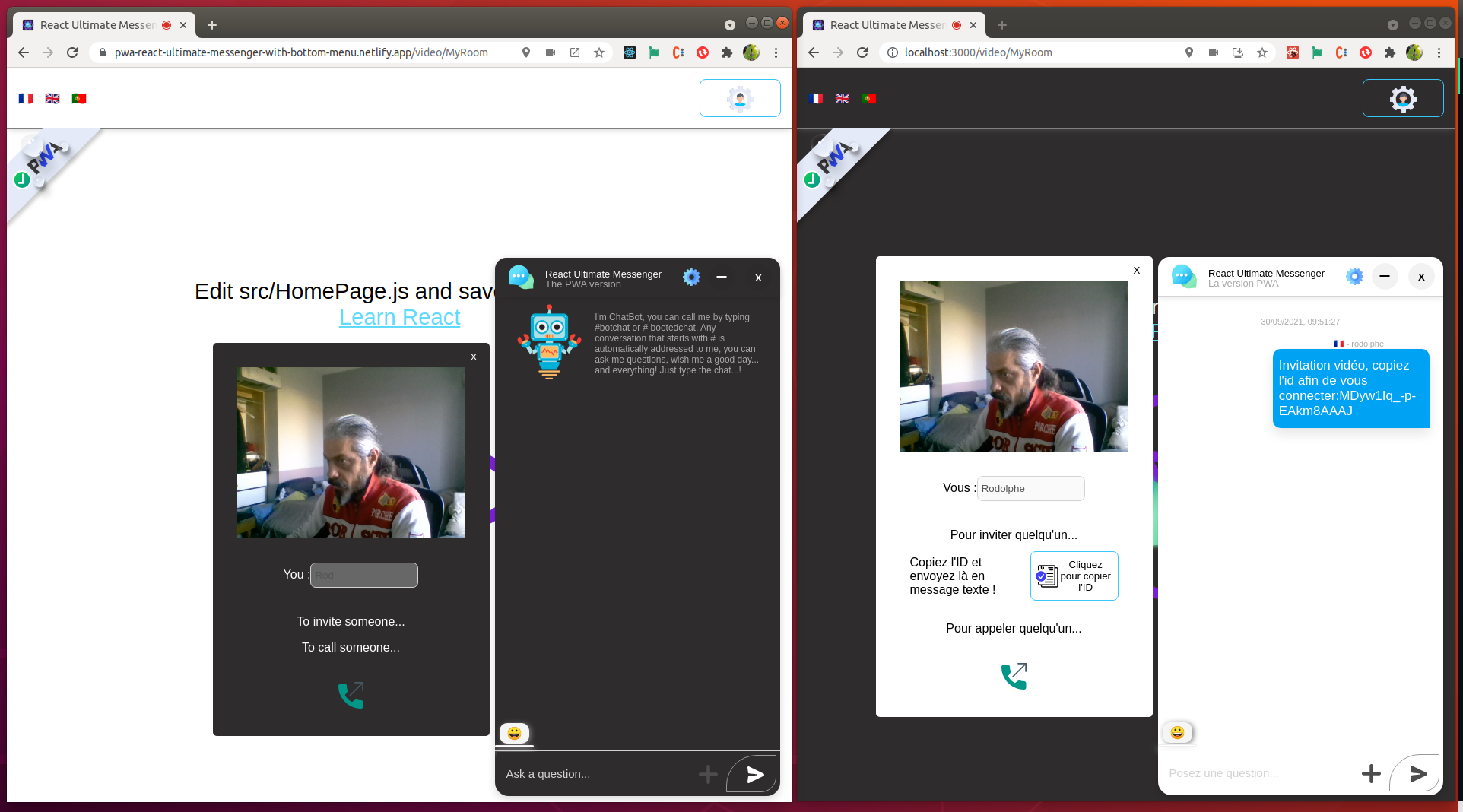
Click on "Call someone" and copy the id in the field.
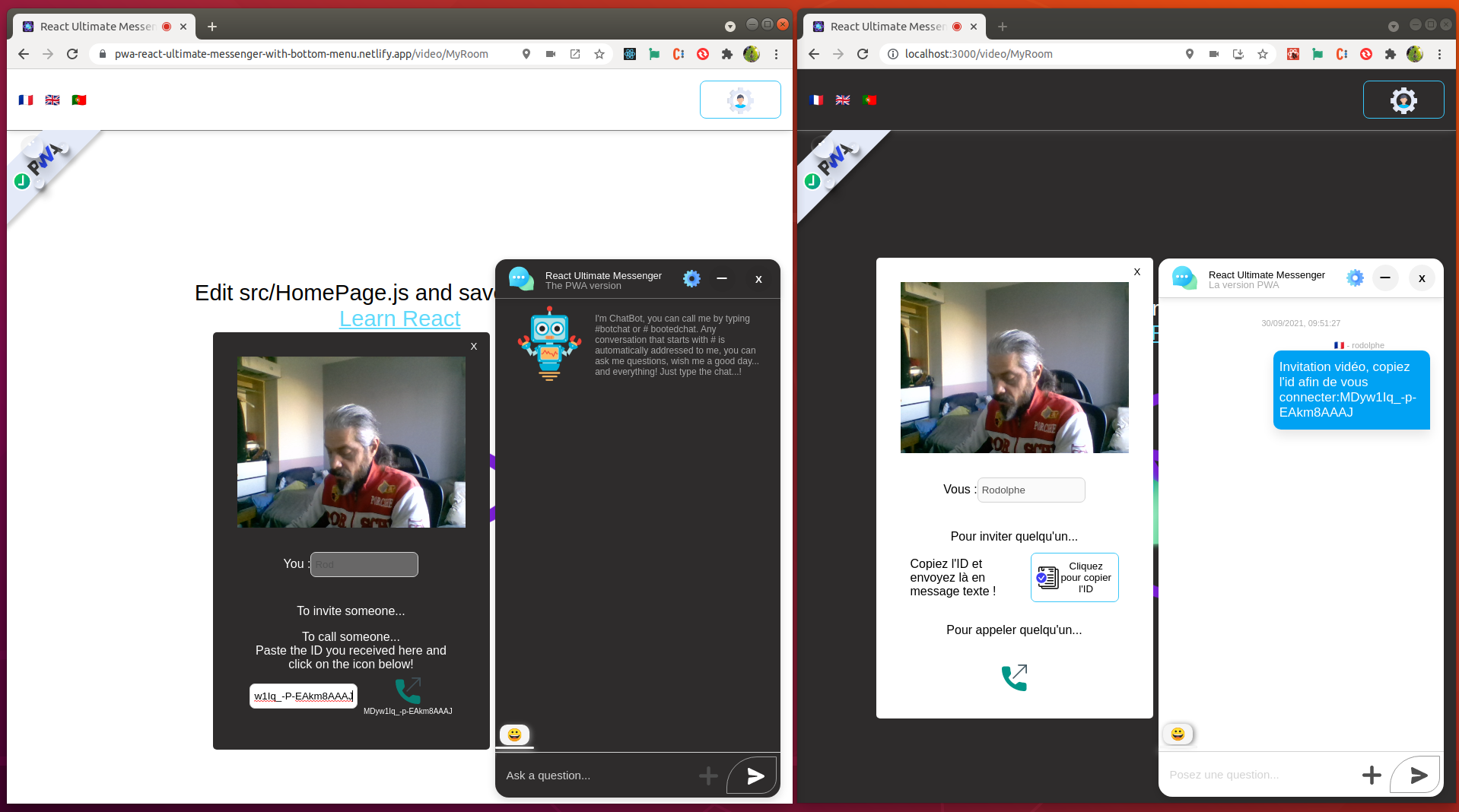
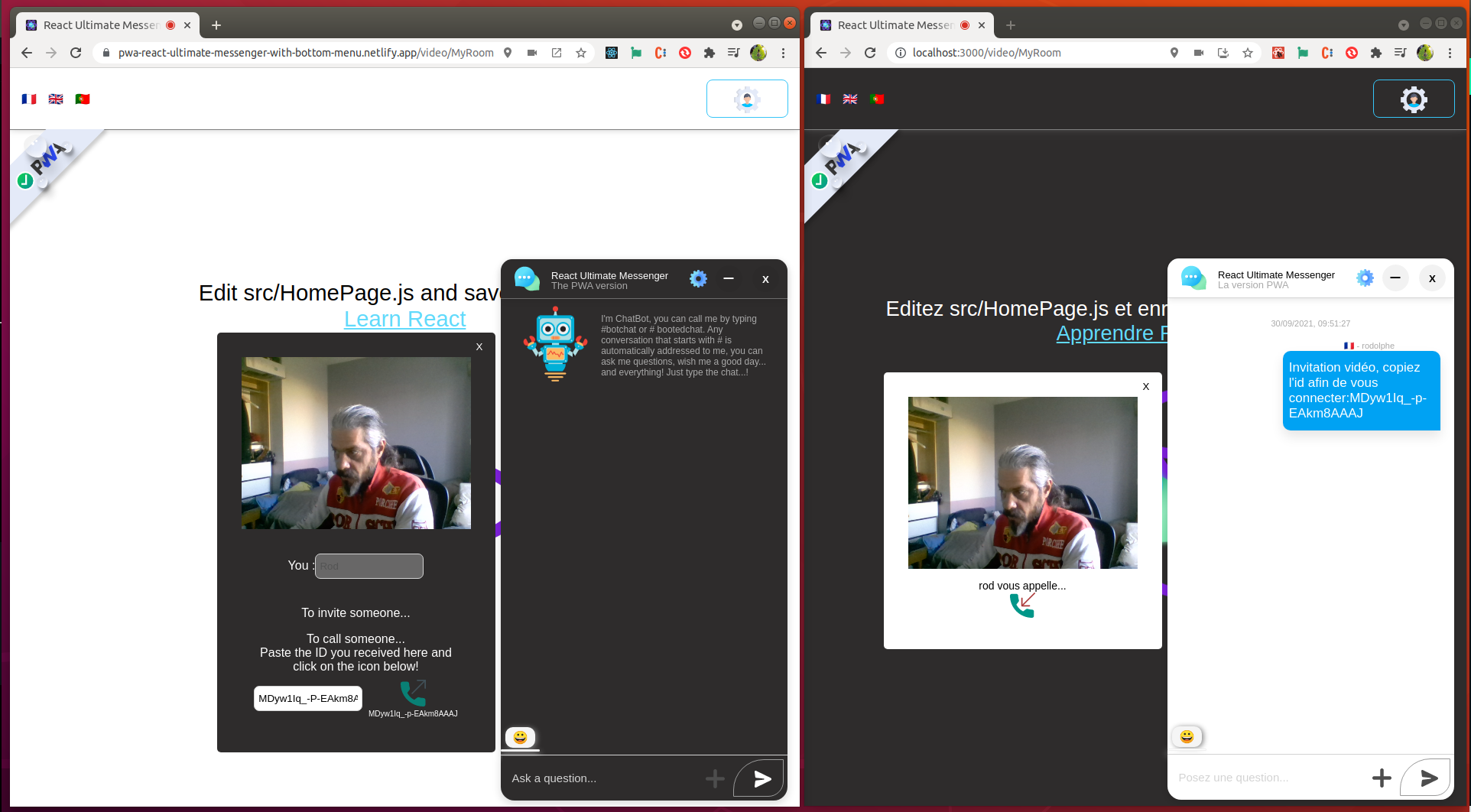
When you click on the phone icon, the other user receives the call in real time.
Now let's see the code and logic behind it!#
Concerning the backend:#
The Server is in its simplest form so that you can, if you wish, join this part to the general backend of the chat.
require("dotenv").config();const express = require("express");const http = require("http");const app = express();const server = http.createServer(app);const io = require("socket.io")(server, {  cors: {    origin: process.env.FRONTEND_URL,    methods: ["GET", "POST"],  },});
io.on("connection", (socket) => {  socket.emit("me", socket.id);
  socket.on("disconnect", () => {    socket.broadcast.emit("callEnded");  });
  socket.on("callUser", (data) => {    io.to(data.userToCall).emit("callUser", {      signal: data.signalData,      from: data.from,      name: data.name,    });  });
  socket.on("answerCall", (data) => {    io.to(data.to).emit("callAccepted", data.signal);  });});
server.listen(process.env.SOCKET_VIDEO_CHAT_PORT, () =>  console.log(`server is running on port ${process.env.SOCKET_VIDEO_CHAT_PORT}`));
On the frontend side!#
you have a useVideoChat custom hook
// MODULES IMPORTSimport Peer from "simple-peer";import io from "socket.io-client";import { useEffect, useRef, useState } from "react";import { useRecoilState } from "recoil";// STATEMANAGMENT IMPORTSimport usernameAtom from "chatComponents/stateManager/atoms/usernameAtom";import callEndedAtom from "chatComponents/stateManager/atoms/callEndedAtom";import messagesAtom from "chatComponents/stateManager/atoms/messagesAtom";import roomIdAtom from "chatComponents/stateManager/atoms/roomIdAtom";
const socket = io.connect(process.env.REACT_APP_VIDEO_CHAT_WEBSERVICE);
const useVideoChat = () => {  const [me, setMe] = useState("");  const [stream, setStream] = useState();  const [receivingCall, setReceivingCall] = useState(false);  const [caller, setCaller] = useState("");  const [callerSignal, setCallerSignal] = useState();  const [callAccepted, setCallAccepted] = useState(false);  const [idToCall, setIdToCall] = useState("");  const [callEnded, setCallEnded] = useRecoilState(callEndedAtom);  const [name, setName] = useRecoilState(usernameAtom);  // eslint-disable-next-line no-unused-vars  const [messages, setMessages] = useRecoilState(messagesAtom);  const myVideo = useRef();  const userVideo = useRef();  const connectionRef = useRef();  const [roomName] = useRecoilState(roomIdAtom);
  useEffect(() => {    navigator.mediaDevices      .getUserMedia({ video: true, audio: true })      .then((stream) => {        setStream(stream);        myVideo.current.srcObject = stream;      });
    socket.on("me", (id) => {      setMe(id);      localStorage.setItem("me", id);      if (localStorage.getItem("username") !== null) {        let theName = localStorage.getItem("username");        setName(theName);      }    });
    socket.on("callUser", (data) => {      setReceivingCall(true);      setCaller(data.from);      setName(data.name);      setCallerSignal(data.signal);    });  }, [me, messages]);
  const callUser = (id) => {    const peer = new Peer({      initiator: true,      trickle: false,      stream: stream,    });    peer.on("signal", (data) => {      socket.emit("callUser", {        userToCall: id,        signalData: data,        from: me,        name: name,      });    });    peer.on("stream", (stream) => {      userVideo.current.srcObject = stream;    });    socket.on("callAccepted", (signal) => {      setCallAccepted(true);      peer.signal(signal);    });
    connectionRef.current = peer;  };
  const answerCall = () => {    setCallAccepted(true);    const peer = new Peer({      initiator: false,      trickle: false,      stream: stream,    });    peer.on("signal", (data) => {      socket.emit("answerCall", { signal: data, to: caller });    });    peer.on("stream", (stream) => {      userVideo.current.srcObject = stream;    });
    peer.signal(callerSignal);    connectionRef.current = peer;  };
  const leaveCall = () => {    setCallEnded(true);    setTimeout(() => {      window.location.replace(`/chat/${roomName}`);    }, 1200);    connectionRef.current.destroy();  };
  return {    stream,    myVideo,    callAccepted,    callEnded,    userVideo,    name,    setName,    me,    idToCall,    setIdToCall,    leaveCall,    callUser,    receivingCall,    answerCall,  };};
export default useVideoChat;
Then comes the component that uses the custom hook
// MODULES IMPORTSimport { Fragment, useEffect, useState } from "react";import { CopyToClipboard } from "react-copy-to-clipboard";import { useTranslation } from "react-i18next";import { useRecoilState } from "recoil";// CSS IMPORTSimport "./videoChatComponent.css";// HOOKS IMPORTSimport useVideoChat from "chatComponents/hooks/useVideoChat";// STATEMANAGMENT IMPORTSimport roomIdAtom from "chatComponents/stateManager/atoms/roomIdAtom";// COMPONENTS IMPORTSimport ChatRoom from "chatComponents/components/chatRoom/ChatRoom/ChatRoom";import Loader from "chatComponents/components/loader/Loader";// ASSETS IMPORTSimport CallIcon from "chatComponents/assets/callTo.svg";import CallFrom from "chatComponents/assets/callFrom.svg";import HangUpCall from "chatComponents/assets/hang-up.svg";import Assignement from "chatComponents/assets/assignment.svg";import AssignementWhite from "chatComponents/assets/assignment-white.svg";import Bell from "chatComponents/assets/sounds/mixkit-fairy-bells-583.mp3";import selectedDarkThemeAtom from "chatComponents/stateManager/atoms/selectedDarkThemeAtom";import { useAlert } from "react-alert";import useMobile from "chatComponents/hooks/useMobile";
const VideoChatComponent = () => {  const alert = useAlert();  const [roomName] = useRecoilState(roomIdAtom);  const [selectedDarkTheme] = useRecoilState(selectedDarkThemeAtom);  const { isMobile } = useMobile();
  const {    stream,    myVideo,    callAccepted,    callEnded,    userVideo,    name,    setName,    me,    idToCall,    setIdToCall,    leaveCall,    callUser,    receivingCall,    answerCall,  } = useVideoChat();  const [clickedInvitation, setClickedInvitation] = useState(false);  const [clickedCall, setClickedCall] = useState(false);  const { t } = useTranslation();
  const handleClickInvitation = () => {    if (clickedInvitation) {      setClickedInvitation(false);    }    if (!clickedInvitation) {      setClickedInvitation(true);      setClickedCall(false);    }  };  const handleClickCall = () => {    if (clickedCall) {      setClickedCall(false);    }    if (!clickedCall) {      setClickedCall(true);      setClickedInvitation(false);    }  };

  return (    <Fragment>      <ChatRoom />      {stream && (        <div          className={            isMobile              ? "video-chat-container video-chat-container-mobile"              : "video-chat-container"          }        >          <div            className={              callAccepted || receivingCall                ? selectedDarkTheme                  ? "myId marginTopContent dark-background white"                  : "myId marginTopContent light-background black"                : selectedDarkTheme                ? "myId dark-background white"                : "myId light-background black"            }            style={{ position: "relative" }}          >            <button              onClick={() => {                window.location.replace(`/chat/${roomName}`);              }}              className={                selectedDarkTheme                  ? "closed-video-chat-cross white"                  : "closed-video-chat-cross black"              }            >              X            </button>            {stream ? (              <div className="video-container">                {isMobile ? (                  <div className="video">                    {stream && (                      <video                        playsInline                        muted                        ref={myVideo}                        autoPlay                        style={{                          width: "240px",                          paddingLeft: 22,                          paddingRight: 22,                        }}                      />                    )}                  </div>                ) : (                  <div className="video">                    {stream && (                      <video                        playsInline                        muted                        ref={myVideo}                        autoPlay                        style={{                          width: "300px",                        }}                      />                    )}                  </div>                )}                <div className="video">                  {callAccepted && !callEnded ? (                    <video                      playsInline                      ref={userVideo}                      autoPlay                      style={{ width: "300px" }}                    />                  ) : null}                </div>              </div>            ) : (              <Loader />            )}            {!receivingCall && !callAccepted && (              <div className="inputs-video-chat">                <div className="you-section">                  <label htmlFor="Name">{t("youVideoCHat")}</label>                  <input                    disabled={name !== "" ? true : false}                    id="filled-basic1"                    label="Name"                    variant="filled"                    value={name}                    onChange={(e) => setName(e.target.value)}                    style={{ marginBottom: "20px" }}                  />                </div>                <hr style={{ width: "100%" }} />                <b                  style={{ cursor: "pointer" }}                  onClick={handleClickInvitation}                >                  {t("invitationVideoChat")}                </b>                <div                  className={                    clickedInvitation ? "invitation-section" : "hiddenParams"                  }                >                  <p style={{ width: "71%", textAlign: "left" }}>                    {t("copyId")}                  </p>                  <CopyToClipboard text={`${t("messageInvitation")}${me}`}>                    <button                      onClick={() =>                        alert.success(`${t("youHaveCopiedId")}: ${me}.`)                      }                      className={                        selectedDarkTheme                          ? "button-video-chat white"                          : "button-video-chat black"                      }                      variant="contained"                      color="primary"                    >                      <img                        src={selectedDarkTheme ? AssignementWhite : Assignement}                        alt="assigment"                        style={{ width: 30 }}                      />{" "}                      {t("clickToCopyId")}                    </button>                  </CopyToClipboard>                </div>                <hr style={{ width: "100%" }} />                <b style={{ cursor: "pointer" }} onClick={handleClickCall}>                  {t("callSomeOne")}                </b>                <div className={clickedCall ? "call-section" : "hiddenParams"}>                  <p style={{ width: "100%", textAlign: "center" }}>                    {t("pasteToCall")}                  </p>                  <div className="call-content">                    <input                      autoComplete="off"                      id="filled-basic"                      label="ID to call"                      variant="filled"                      value={idToCall}                      onChange={(e) => setIdToCall(e.target.value)}                    />                    <div className="call-button">                      {callAccepted && !callEnded ? (                        <button                          className="call-button-green"                          onClick={() => {                            leaveCall();                          }}                        >                          <img                            src={HangUpCall}                            style={{ width: 33 }}                            alt="endCall"                          />                        </button>                      ) : !receivingCall ? (                        <button                          className="call-button-green"                          aria-label="call"                          onClick={() => callUser(idToCall)}                        >                          <img                            src={CallIcon}                            style={{ width: 33 }}                            alt="call"                          />                        </button>                      ) : null}                      <p style={{ fontSize: 10 }}> {idToCall}</p>                    </div>                  </div>                </div>              </div>            )}            {callAccepted && !callEnded ? (              <button                className="call-button-green"                onClick={() => {                  leaveCall();                  window.location.replace(`/chat/${roomName}`);                }}              >                <img src={HangUpCall} style={{ width: 33 }} alt="endCall" />              </button>            ) : !receivingCall ? (              <button                className={clickedCall ? "hiddenParams" : "call-button-green"}                aria-label="call"                // onClick={() => callUser(idToCall)}                onClick={handleClickCall}              >                <img                  src={CallIcon}                  style={{ width: 33, marginTop: 22 }}                  alt="call"                />              </button>            ) : null}            {receivingCall && !callAccepted ? (              <div className="caller">                <audio loop autoPlay>                  <source src={Bell} />                </audio>                <h1                  className={selectedDarkTheme ? "white" : "black"}                  style={{ fontSize: 14 }}                >                  {name} {t("callMessage")}                </h1>                <button className="call-button-green" onClick={answerCall}>                  <img src={CallFrom} style={{ width: 33 }} alt="call" />                </button>              </div>            ) : null}          </div>        </div>      )}    </Fragment>  );};
export default VideoChatComponent;
And then, let see the tools chat in BottomChatComponent
...import { withVideoChat } from "postInstallConfig/withVideoChat";
const BottomChatComponent = (props) => {  const {    ...    VideoCall,    handleVideoChat,    ...  } = props;  return (    <div>      ...      {withVideoChat && (        <img          onClick={handleVideoChat}          style={{            width: 28,            marginRight: 15,            cursor: "pointer",            marginTop: -5,          }}          src={VideoCall}          alt="call"          className={plusSection ? "" : "hiddenParams"}        />      )}      ...    </div>  );};
export default BottomChatComponent;
And the video chat invitation section in MessagesComponent
...{message.body.includes("Invitation vidéo") || message.body.includes("Video invitation") ? !message.ownedByCurrentUser && (!clickedCopyId ? ( <CopyToClipboard text={idChatInvitation}> <button disabled={clickedCopyId ? true : false} className={ clickedCopyId ? "idForCallInvitation-clicked" : "idForCallInvitation" } onClick={() => { setClickedCopyId(true); alert.success( `${t("youHaveCopiedId")}: ${idChatInvitation}.` ); }} > Copiez </button> </CopyToClipboard> ) : ( <Fragment> <p>Le chat vidéo est entrain de démarrer...</p> </Fragment> )) : null}...